
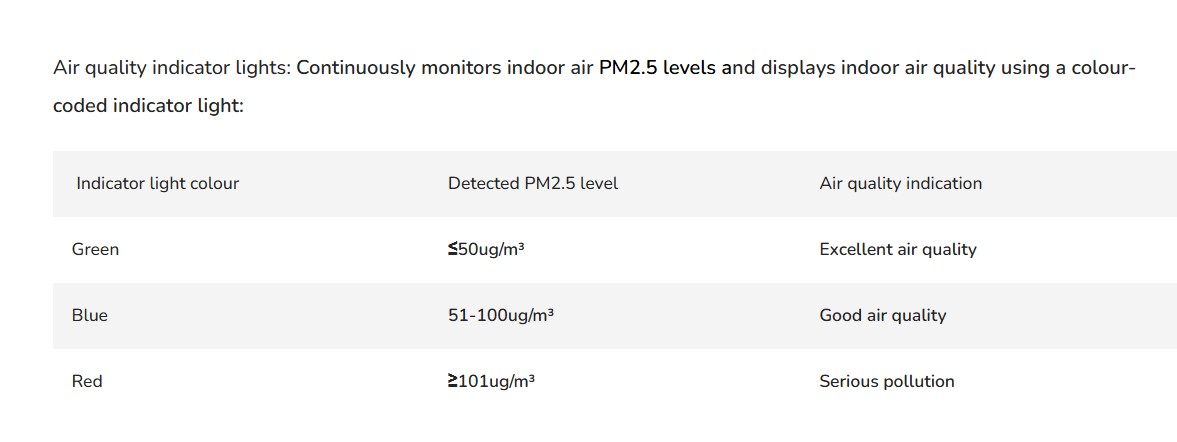
The Air Quality Indicator lights on the Leone Pro ION626 show the current air quality detected by the unit's built-in air quality sensor. The indicator changes colour based on the level of airborne particles in the room:
1. Blue – Good air quality. The air is clean, with a low level of airborne particles.
2. Green – Excellent air quality. There are some airborne particles present, but the air quality is still acceptable.
3. Red – Poor air quality. A high concentration of airborne particles has been detected, and the purifier will typically increase its fan speed automatically when in Auto Mode to clean the air more quickly.
A few things to keep in mind:
The sensor may briefly show red when exposed to dust, cooking fumes, smoke, aerosols, or other airborne particles.
It may take a few minutes for the indicator to return to green or blue once the air has been cleaned.
Regularly cleaning the air quality sensor and replacing the filters as recommended will help ensure accurate readings.
Should you need further assistance please contact us at support@andatech.com.au